Creating NuGet package from Twin library
NuGet is the preferred way to manage dependencies in an AXSharp project. For creating NuGet packages you would follow the same procedure as with ordinary NuGet packages.
Additional configuration
To properly create and consume a package you'd need to add the PLC project's metadata to your NuGet package.
You can do it by adding the following in the respective csproj file of your twin project.
<ItemGroup>
<Folder Include=".meta\" />
<Content Include=".meta\**"/>
</ItemGroup>
or
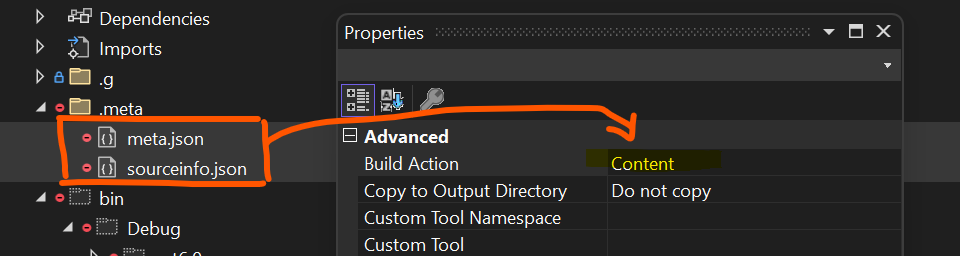
Set the files in the .meta folder to build action to Content.
Versioning
Important The APAX package and respective Twin NuGet package must be released with the same version number. APAX package and NuGet package with the same version number are considered aligned.
UI companion packages
A PLC library can ship a UI companion package alongside the twin connector — for example a set of auto-generated Blazor components. ixc handles the bookkeeping automatically via axsharp.companion.json.
Library author
Set UiHostProject in your library's AXSharp.config.json to the path of the UI .csproj within your repository:
{
"OutputProjectFolder": "../ix",
"UiHostProject": "../MyLib.UI/MyLib.UI.csproj"
}
When ixc compiles the library it:
- Reads the
<PackageId>from the UI project file (falls back to<apax-name>.UIif the file is absent). - Writes
UiIdandUiVersionintoaxsharp.companion.jsonnext to the existing twin connector fields.
{
"Id": "MyLib.Twin",
"Version": "1.2.3",
"UiId": "MyLib.UI",
"UiVersion": "1.2.3"
}
The UI package version always matches the library version — publish both together.
Consumer
Set UiHostProject in your application's AXSharp.config.json to the Blazor or UI host project that should receive the dependency:
{
"OutputProjectFolder": "ix",
"UiHostProject": "../MyBlazorApp/MyBlazorApp.csproj"
}
When ixc resolves a dependency whose axsharp.companion.json contains UiId/UiVersion, it automatically:
- Adds a NuGet package reference to
UiHostProjectwhen the dependency is consumed as a NuGet package. - Adds a project reference to
UiHostProjectwhen the dependency is consumed directly from source (i.e. the dependency has its ownAXSharp.config.jsonwithUiHostProjectset).
If UiHostProject is not configured, the UI reference step is skipped and an informational message is logged.